



Hey Adopter,
Most agency owners, consultancy founders, and SMB operators start Monday by opening email. Within ten minutes, three people have told you what your priorities are. By lunch you’ve answered everyone except yourself.
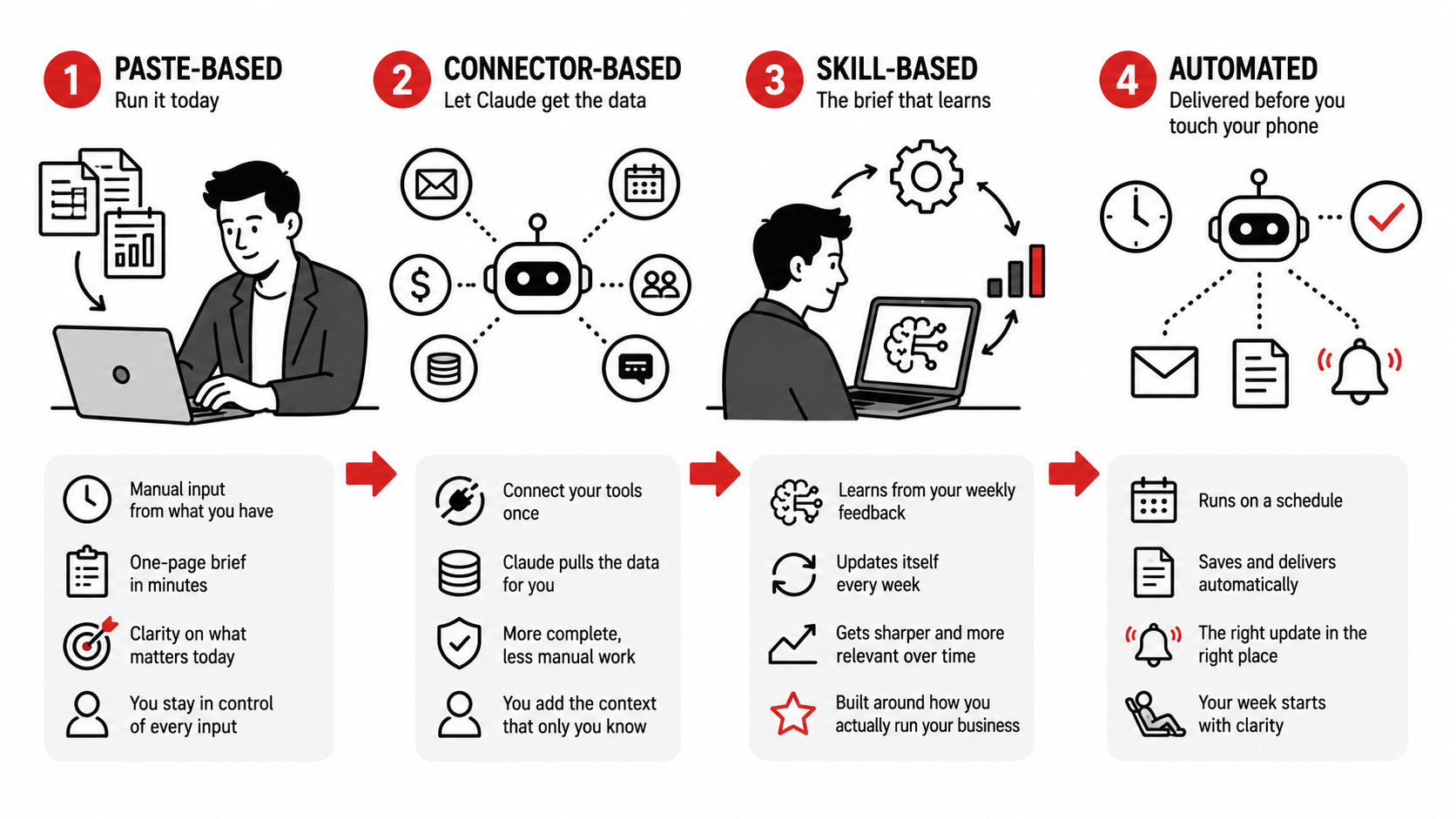
Start by pasting your numbers into a prompt and getting a one-page brief back. Graduate to connectors so Claude fetches its own data. Convert the whole thing into a skill that updates itself every Monday based on what you tell it. Then, if you want the brief waiting for you before you’ve touched your phone, automate the entire workflow.
Level 1 you can run today. The bonus level is what you’ll be running six months from now. Here are all four, plus a filled example so you know exactly what you’re building toward.
For skimmers. Scroll to Level 1 below, copy the prompt, paste in five numbers from your business, get your brief in two minutes. Come back for the rest when you want to take it further.
What a finished brief looks like
This is what the system produces. Real shape, illustrative numbers. Yours will run shorter once you trim sections you don’t care about. For things like this I always ask the output to be in HTML format.
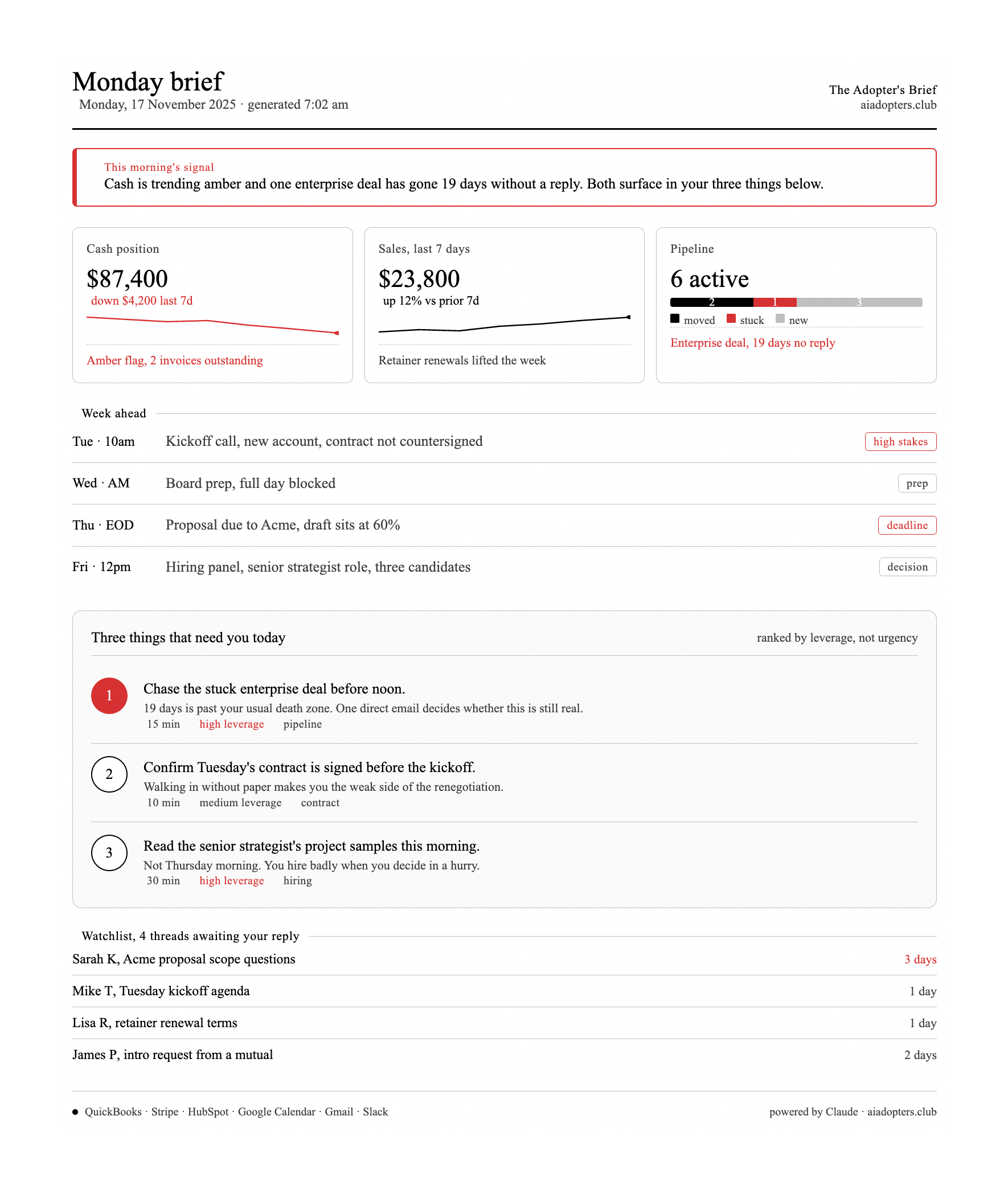
Two minutes to read. Five minutes to act on. That’s the whole game.
Why the brief is the highest-leverage prompt you’ll run all week
Information without structure is just noise. You already have the numbers. The bank balance is in your banking app. Last week’s sales sit in Stripe, Square, or QuickBooks. The deals are in your CRM or your head. The week’s commitments are on your calendar.
The problem is none of these talk to each other on Monday morning. You either spend ninety minutes hopping between tabs, or you skip the review and let the day happen to you.
A briefing reverses that. Ten minutes of input, two minutes of output, and you walk into the week knowing what to defend, what to ignore, and where the leverage sits.
Urgent stuff has built-in pressure. Leverage stuff needs the brief.
The compound effect matters more than the weekly one. After four weeks you start to see patterns. The same deal stalls every month at the same stage. Cash dips every third week. Tuesday afternoons are where your strategic work goes to die. The brief surfaces what your gut already suspects but couldn’t prove.
What you need before you start
Ten minutes Sunday evening or Monday before 7am. Same time every week.
Access to whatever data you have. You don’t need all of it. The prompt degrades gracefully when sections are missing.
An AI chat that handles long inputs. Claude or ChatGPT, free tier is fine for Level 1.
A place to save the output. A Google Doc, a Notion page, or your notes app. Don’t trust your memory to hold it.
That’s it. No connectors, no plugins, no API keys for Level 1.
Won’t work if any of these are true
The brief is not a fix-all. Skip it if:
Your Monday starts at 9am with a meeting. The brief needs ten quiet minutes before the world catches you. If your team is already in your calendar by the time you wake up, fix that first.
You won’t be honest about what’s on your mind. The brain dump at the end of the input is the most valuable line in the whole prompt. If you’d lie to a therapist, you’ll lie to the prompt, and the output will lie back.
Your business is in a genuine crisis this week. Stabilise the urgent fire before optimising for leverage. The brief is for operators who already have the basics under control.
You expect the AI to make decisions. The brief surfaces signal. You still call the shots. If you want a tool that thinks for you, this isn’t it.
If none of those apply, keep reading.
Level 1, paste-based, runs in any AI chat
This is where every reader starts. You paste your data, Claude generates the brief. The version I run myself takes about eight minutes most Sunday evenings, less when the inputs are stable.
Manual, slightly tedious, and the friction is the point. Pasting forces you to look at the numbers yourself before the AI synthesises them.
Copy everything between the lines into Claude or ChatGPT. The bracketed sections are where your data goes.
