


Hey Adopter,
A company called Rakuten just reported something that matters: they took a task that used to consume an entire eight-hour workday and compressed it down to one hour. Same quality, same accuracy, eight times faster.
They did this using a new feature from Anthropic, the company that makes Claude AI. The feature is called Claude Skills, and it launched on October 16, 2025.
Think about how you use AI tools like ChatGPT or Claude right now. You type in what you want, maybe including some specific instructions about how you want things formatted. It works. Next week, you need the same type of output again, so you try to remember exactly how you phrased things last time. Sometimes it works, sometimes you’re tweaking and adjusting to get it right again.
Skills changes this completely. Instead of re-explaining your preferences every single time, you teach Claude once how you want things done. You save those instructions as a “Skill.” From that point forward, whenever you need that same type of work, Claude automatically remembers and applies your exact preferences.
It’s like training a new assistant on your specific way of doing things, except you only have to train them once and they never forget.
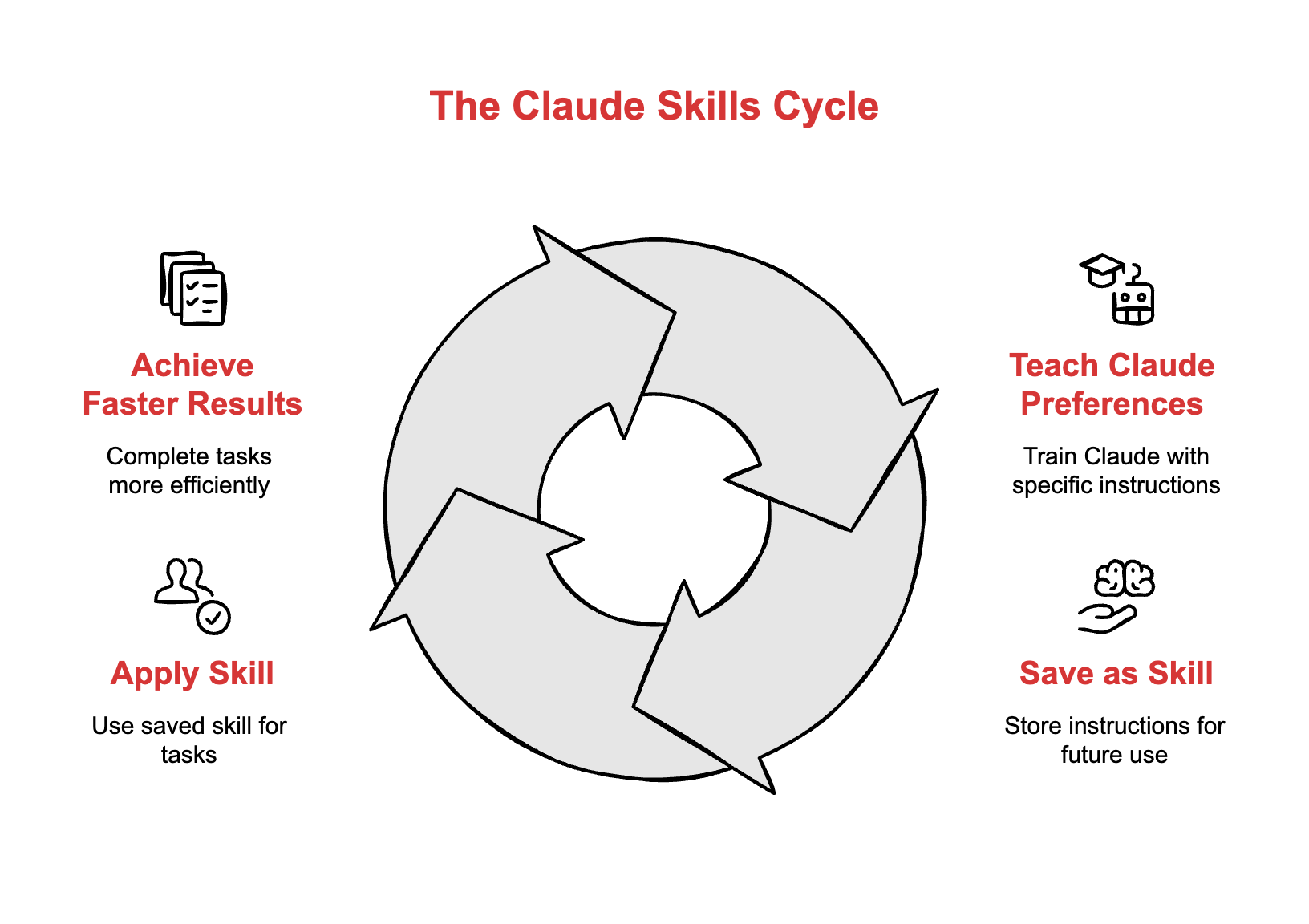
What Skills actually does for you
Skills are saved instructions that Claude loads only when relevant to your task. You’re not forcing Claude to read every instruction you’ve ever written, every single time you talk to it.
Say you create three Skills: one for your company’s brand guidelines, one for building Excel reports, and one for making PowerPoint slides. When you ask Claude to create your quarterly report, it automatically pulls in all three Skills and uses them together. No copying and pasting instructions. No reminding Claude what your brand colors are.
Claude ships with four ready-to-use Skills that work immediately: Excel for spreadsheets with formulas, PowerPoint for presentations, Word for documents, and PDF for working with PDF files. The Excel Skill handled expert-level financial modeling tests at 83% accuracy, passing five of seven challenges designed for professionals.
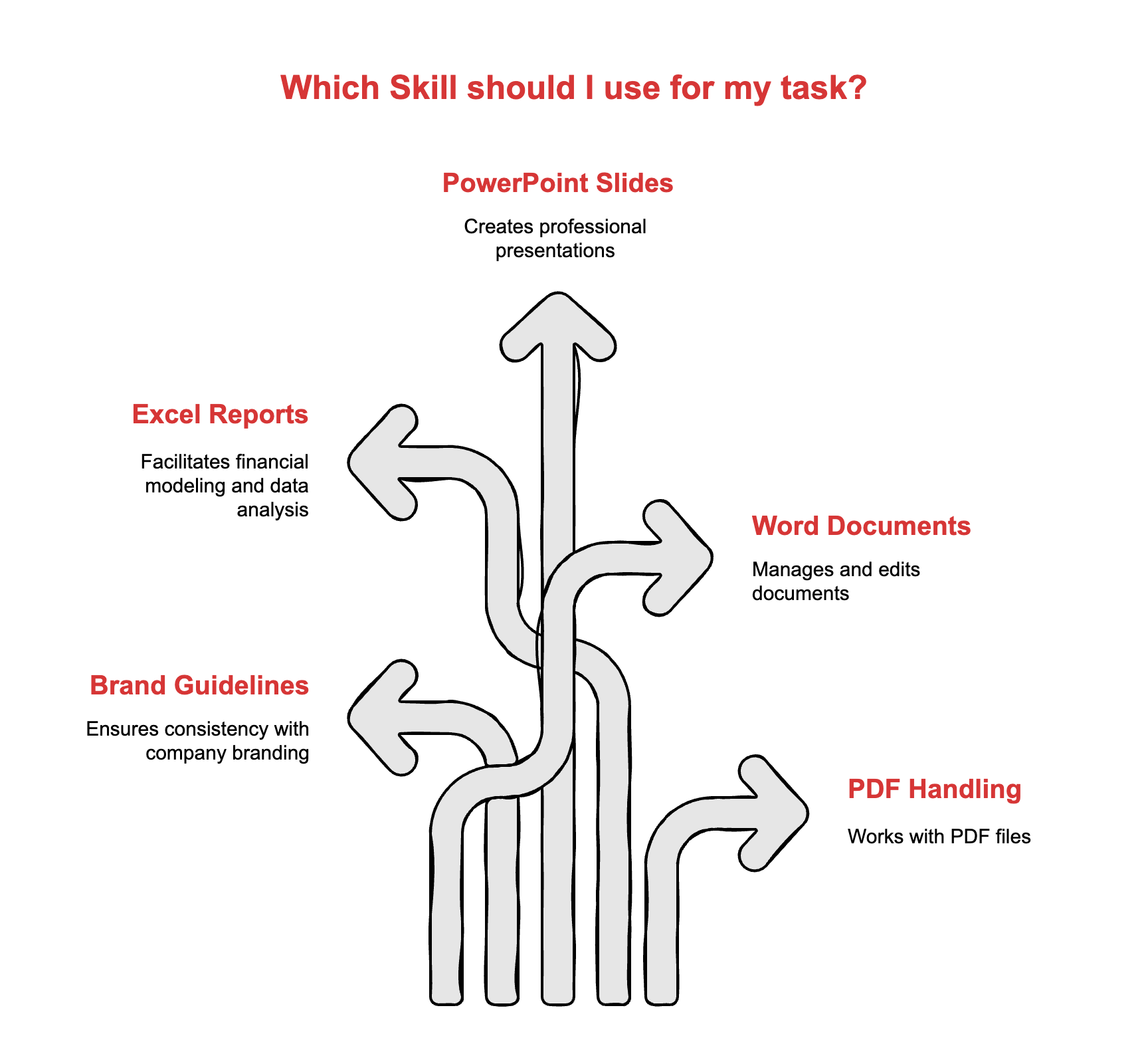
How to start using Skills
You need a Claude Pro subscription or higher. Then it’s straightforward:
Go to Settings, turn on “Code execution and file creation,” scroll to Skills, and upload a folder containing your instructions. That folder needs at least one file called SKILL.md where you write what you want Claude to do.
Example: Create a folder called “weekly-report.” Inside, make a file called SKILL.md. Write your instructions: “When the user asks for a weekly report, format it with these sections: accomplishments, blockers, next week’s priorities. Use bullet points. Keep each section under 100 words.”
Zip that folder. Upload it. Done.
Now when you ask Claude for your weekly report, it follows that format automatically. No prompt engineering. No remembering the exact phrasing that worked last time.
Here’s exactly what a SKILL.md file looks like:
---
name: Weekly Status Report
description: Generates consistent weekly status reports with accomplishments, blockers, and priorities
---

# Weekly Status Report Skill

When the user requests a weekly status report or weekly update, generate a report using this format:

## Accomplishments This Week
- List completed tasks and achievements
- Focus on outcomes, not just activities
- Keep under 100 words

## Current Blockers
- Identify obstacles preventing progress
- Be specific about what’s blocked and why
- Keep under 75 words

## Priorities for Next Week
- List 3-5 key priorities
- Order by importance
- Keep under 75 words

Use bullet points throughout. Keep language clear and professional. If the user provides raw notes or data, extract and organize into this structure.
That’s it. Name and description in the header, instructions in plain English below. No coding required.
How Skills fit into your actual workflow
Here’s what happens when you work with Skills enabled:
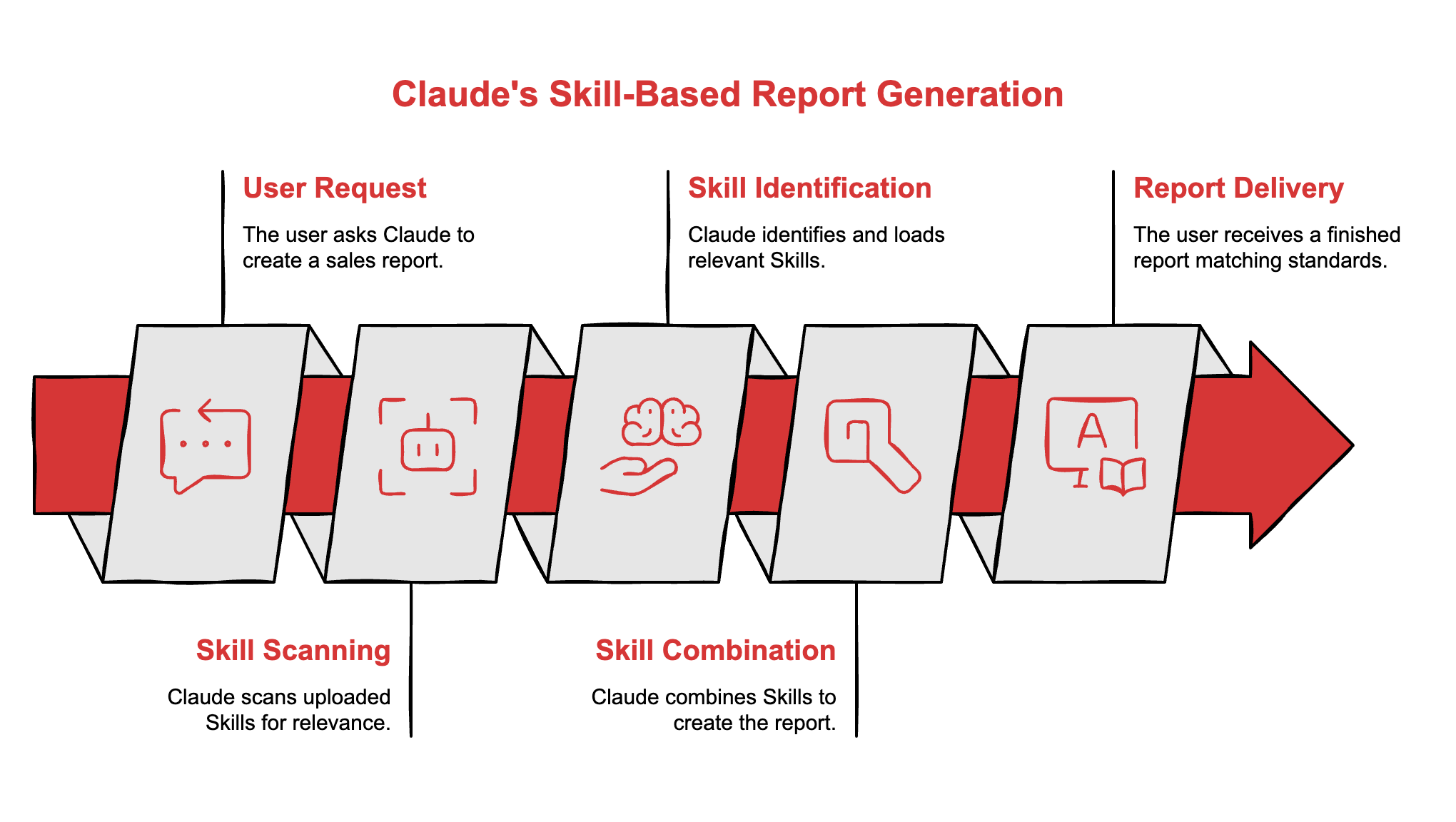
No copying templates. No pasting brand guidelines. No, reminding Claude how you want things formatted. Skills load, combine, execute.
What you should know before diving in
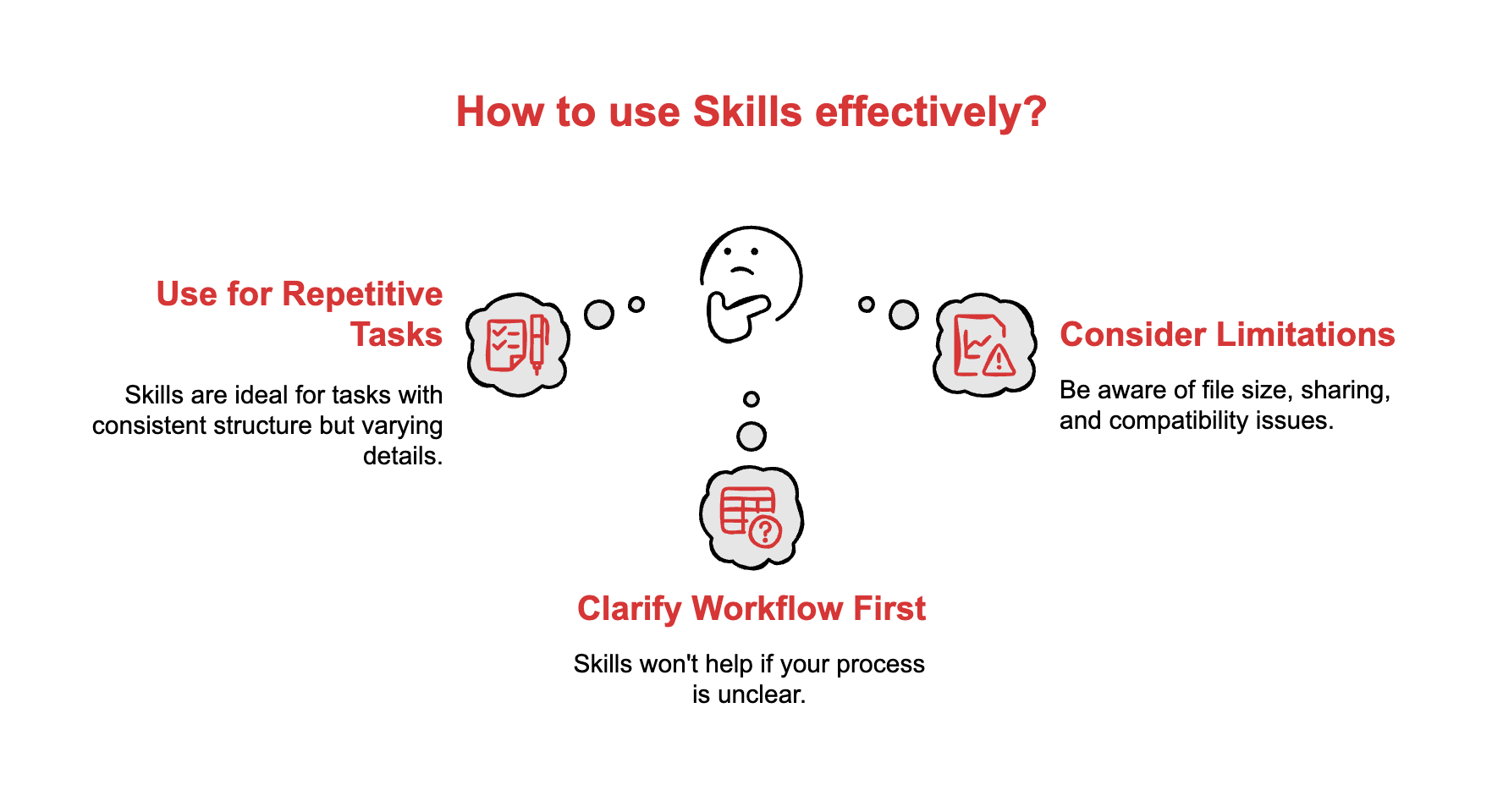
Skills work best for tasks you do repeatedly with small variations. Monthly reports where the structure stays the same but the data changes. Client emails that follow a template but need different details. Meeting summaries that use your company’s format.
If you’re still figuring out your process, Skills won’t help yet. Get your workflow clear first. Write it down as a checklist or template. Then turn that into a Skill.
Current limitations:
Your uploaded Skills can’t exceed 8MB total. That’s plenty for instructions and templates, but not for large datasets.
Each person uploads their own Skills. No company-wide sharing yet, though that’s coming. For now, you share by sending your Skill folder to someone.
Skills don’t work with Claude’s extended thinking mode. If you need the deep reasoning feature for complex problems, you can’t use Skills simultaneously.
Where Skills delivers the biggest wins
Rakuten’s 8x speed improvement tells you what to look for: tasks that take significant time but follow consistent patterns.
Good candidates for Skills:
Reports you generate weekly or monthly where the format never changes but the numbers do.
Proposals or decks where your template stays fixed but client details swap out.
Email responses that follow your company’s voice and include standard information.
Data analysis where you ask the same questions on different datasets.
Bad candidates for Skills:
Brand new projects where you’re still figuring out the approach.
One-off tasks you’ll never repeat.
Work that requires extensive creative variation each time.
Start simple. Pick one repetitive task. Document exactly how you do it. Build a Skill. Measure how much time it saves. Then expand.

Your next step: the complete implementation guide
Everything you need to make Skills work in your organization. Real examples. Setup walkthroughs. Troubleshooting tips. Advanced techniques once you master the basics.
Three reasons this guide matters for you:
Comparison with other AI tools: Detailed breakdown of when to use Skills versus ChatGPT’s GPTs, Microsoft Copilot, or other AI assistants. Specific scenarios where Skills wins and where it doesn’t, so you choose the right tool.
Ready-to-use templates: Pre-built Skill examples you can copy and customize immediately. Common business use cases with complete instructions. No starting from scratch.
Scaling playbook: How to move from your first Skill to dozens. Training your team. Measuring results. Avoiding common mistakes that waste time and money.
Download the Full Claude Skills Business Implementation Guide below 👇
Claude Skills - Business Implementation Guide

Everything you need to make Skills work in your organization. Real examples. Setup walkthroughs. Troubleshooting tips. Advanced techniques once you master the basics.
Start with one Skill this week
Skills launched with no waitlist and no extra cost beyond your Claude subscription. Available right now.
Companies moving fast aren’t building elaborate systems. They’re picking one high-volume task, creating a single Skill for it, and measuring the time saved. Then they expand.
Eight hours to one hour changes how much you can accomplish in a week. The difference between drowning in repetitive work and having time for projects that actually advance your career.
Pick your task. Build your Skill. Measure the difference.
Adapt & Create,
Kamil